

When a 50-step workflow stopped making sense
We started with Vectrix more than 2 years ago. Back then LLM were not at the level they’re currently at. Agents were not really a thing yet and we had to guide the model step by step. We started building our application using LangGraph, which is actually a flow builder, so we can really deterministically decide what happens to everything, like a big flowchart. This worked well for a very long time.
Over the last 6 months our system grew exponentially in complexity. Adding new features and new modalities made this graph more complex by the day, thus making it a lot harder to maintain. Also when something failed in the middle of the flow, the entire run was corrupt and we had to reprocess everything. Rerunning a flow of more than 50 steps became super expensive and also very prone to errors. It’s hard to foresee every bad choice or hallucination an LLM can make during this entire process.
We had to find a solution...
Combining determinism and agentic reasoning
The problem is that throwing away this entire workflow completely and trusting an agent to do everything perfectly is a big leap and we didn’t trust that. So the plan was to use an agent in parts where a lot of freedom is desirable (for example, where you want an LLM to experiment and retry things)
On the other hand, some things are better decided upfront like the high level steps of an extraction flow. We went back to the drawing board and created a high-level flow of steps that are decided deterministically and where we would give the agent freedom. We ended up, at a high level, with something like this.
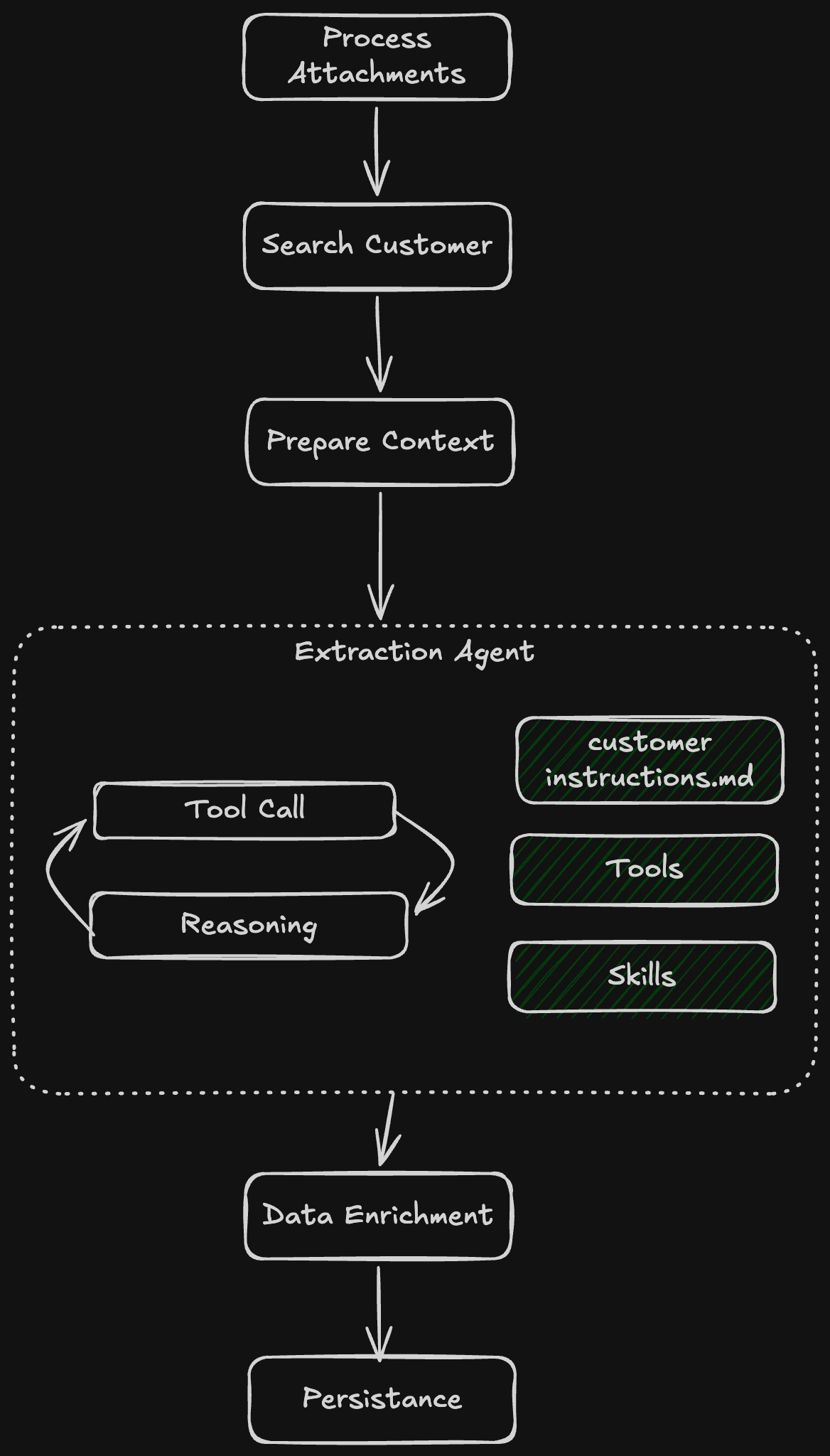
Even with this flow there are a lot of other things that are very important to keep a pipeline stable. For example you need to have clear tool calling instructions for your agents. The objective and prompts need to be clear and very well explained. Otherwise even with the best models, you still risk hallucinations or endless loops.
The second problem: where do the agents run?
Now that we had our vision, we need to decide where these agents can run. There are some options:
Run them inside Vectrix, our existing platform
Use some kind of platform where these agents can run in the cloud
Extending Vectrix with this technology didn’t seem the right choice. Managing sandboxes, persistence across agent sessions, handling file storage, supporting multiple model providers, and so on, is not something that is core to our product.
We set out to find a platform that abstracted most of these concerns away and let us focus on building the actual logic for the agents, not managing the whole infrastructure around it.
Claude Managed Agents was almost perfect
A few months ago I was invited to an AI conference in Brussels and one of the sessions I attended was presented by one of the technical staff from Anthropic. They were promoting Claude Managed Agents.
The timing was almost perfect. I was looking for a solution and this product was exactly what we needed.
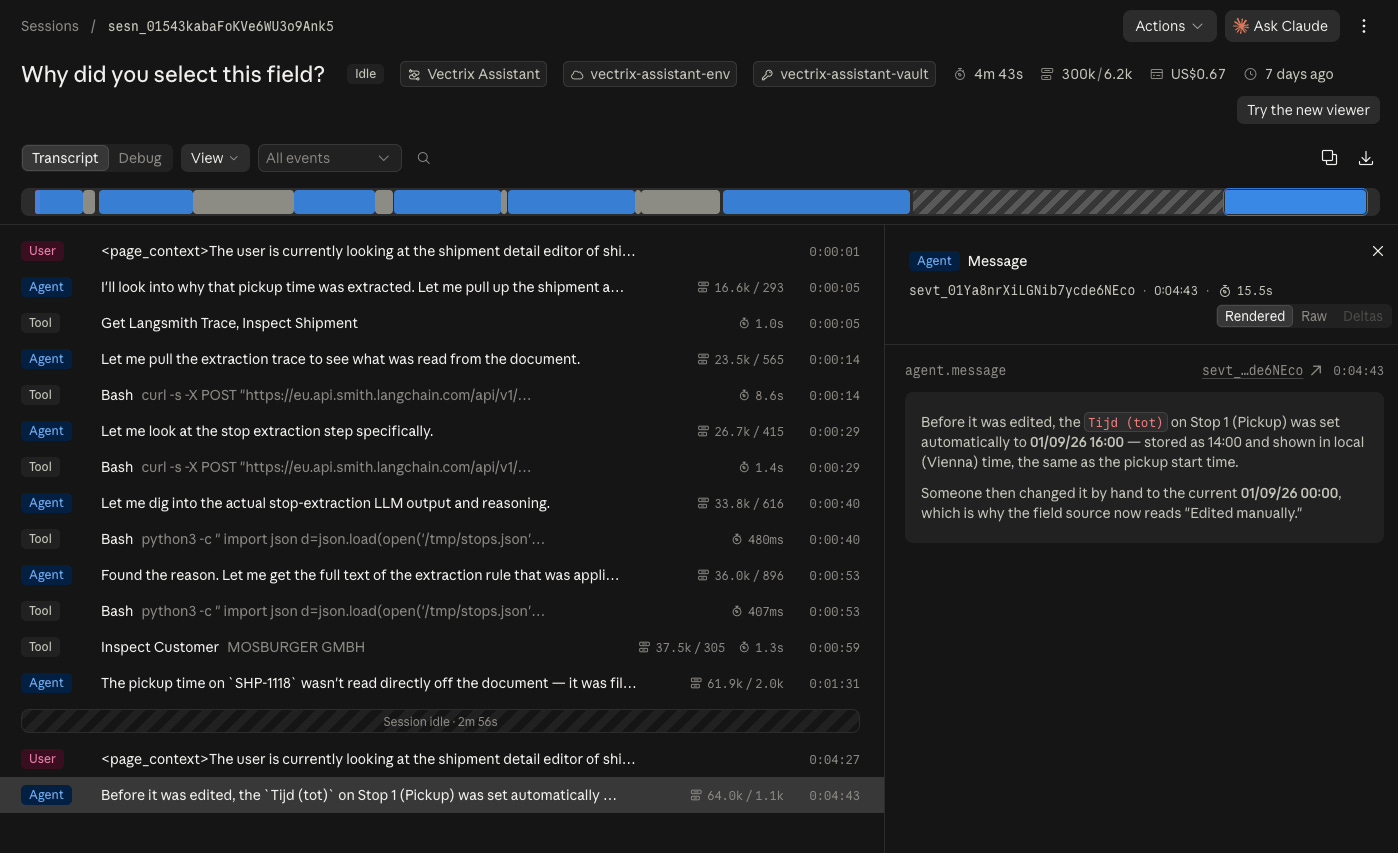
Easy to create new agents using their SDK
A nice UI to see the full agent run, including all the tool calls performed, the reasoning, cost, duration and so on.
Persistent sessions: if you stop a session and you resume it later, all the information is persisted so you don’t have to keep track of this state yourself.
The agent has access to a sandbox so it can run `grep` commands, process files, use the browser, and so on. It works just like it would run on your local machine.
Great out-of-the-box tool integration. Basically the agent can call a tool that you predefine. When your application receives the tool request, it resolves it and sends the result back to the agent and then the run continues. This allows for flexible communication between your application and the agent. Allowing it to call internal APIs
Skills and MCP support just like the tools we are used to like Claude Code, Codex, and all the other agentic harnesses
After running some internal experiments this seemed like the right solution but unfortunately, we were out of luck. Something that was really important to us was not supported.
It did not support running in Europe. It only had a global endpoint and this is a big problem for us, as some of our clients require EU processing.
We are stuck with only Anthropic models and these are quite expensive. Not all tasks require these models and for some things we do, other model families are actually even better (Gemini for vision tasks for example). Being stuck in only the Anthropic ecosystem was also not really an option for us.
So we built OAO
As I couldn’t find an open-source platform that met our requirements, there was one viable option left: build it ourselves. That is where OAO came from: Open Agent Orchestrator
What we ended up building has all the functionality of Claude Managed Agents , but on top of that, you’re able to host it wherever you want, it’s even a breeze to run on your local machine. Just a single command to spin everything up .
We also added multimodal provider support:
OpenRouter
Google
OpenAI
Anthropic
Grok
Ollama
To get the sandboxes working there are also several options in OAO. When running it locally you can create a virtual sandbox in memory, for cloud deployments we have integrations with Daytona (and e2b coming soon). You can just create an API key on these platforms and get started with the OAO right away.
OAO also has first-class API and agentic support, everything you want, like setting up the platform, configuring it and connecting it to your app, debugging runs, and creating new agents, can all be done via the API by your existing coding tool, just create an API key and point your agent to docs.oao.sh and it knows what to do.
We also added a management console that allows you to do everything via the UI, which makes it easy to debug runs, create agents, or do some internal tests without having to ask your Claude Code the whole time :)
Using it in the real world
One of the first workloads we’re experimenting to fully use OAO is to process massive Excel files. This was very difficult to achieve with the current deterministic LangGraph flow, because we had to load everything into context, making the run super expensive and prone to errors.
By using a sandboxed agent we are able to give the LLM the tools to dissect the worksheet by using grep tools and some other Python packages and then get the same extraction results, but faster and cheaper. Also, because these Excel files are very big, the model needs to have some time to reason, experiment with something, and then try something else. This is a luxury we didn’t really have with LangGraph.
A quick look at OAO
The console is deliberately practical. It lets us configure agents and, just as importantly, see what happened during a run.
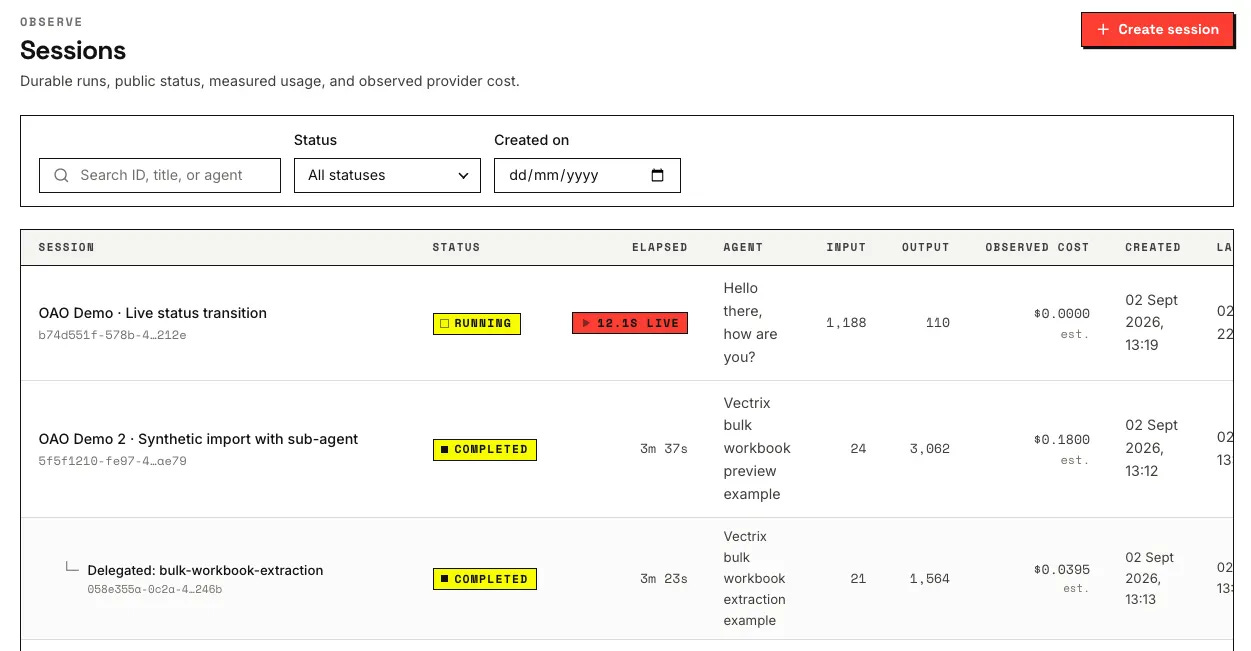
Sessions: every run in one searchable view, with status, duration, agent, token usage, and estimated cost.
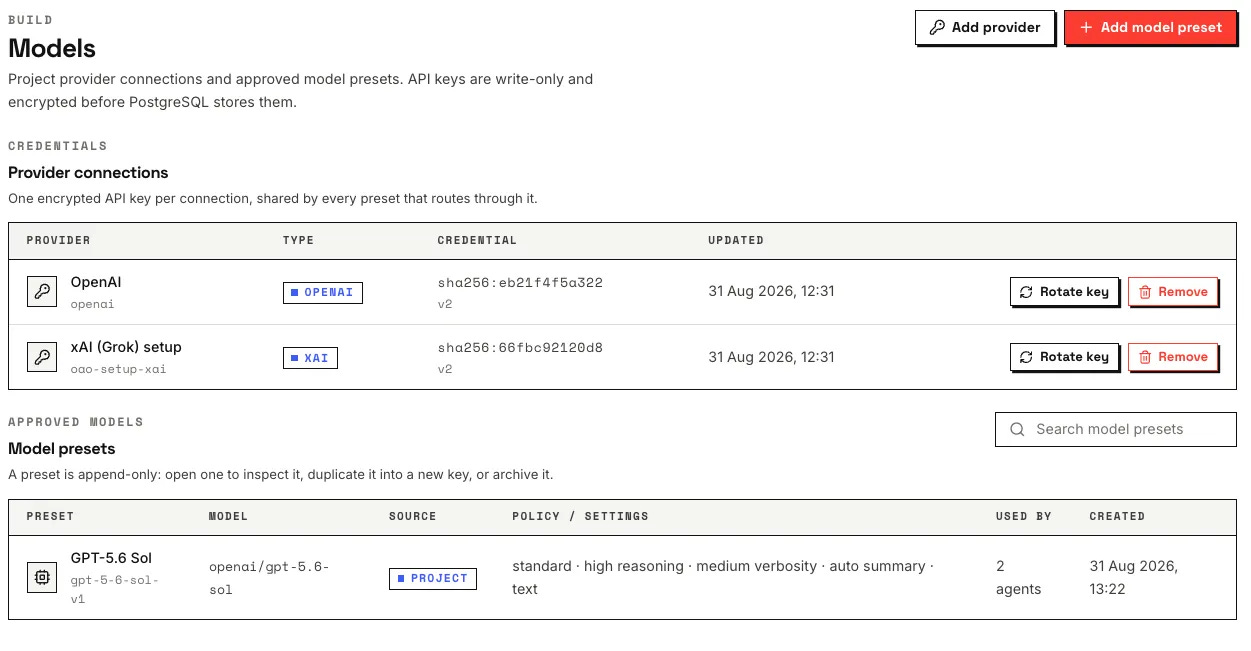
Models: project-level provider connections and the model presets agents are allowed to use.
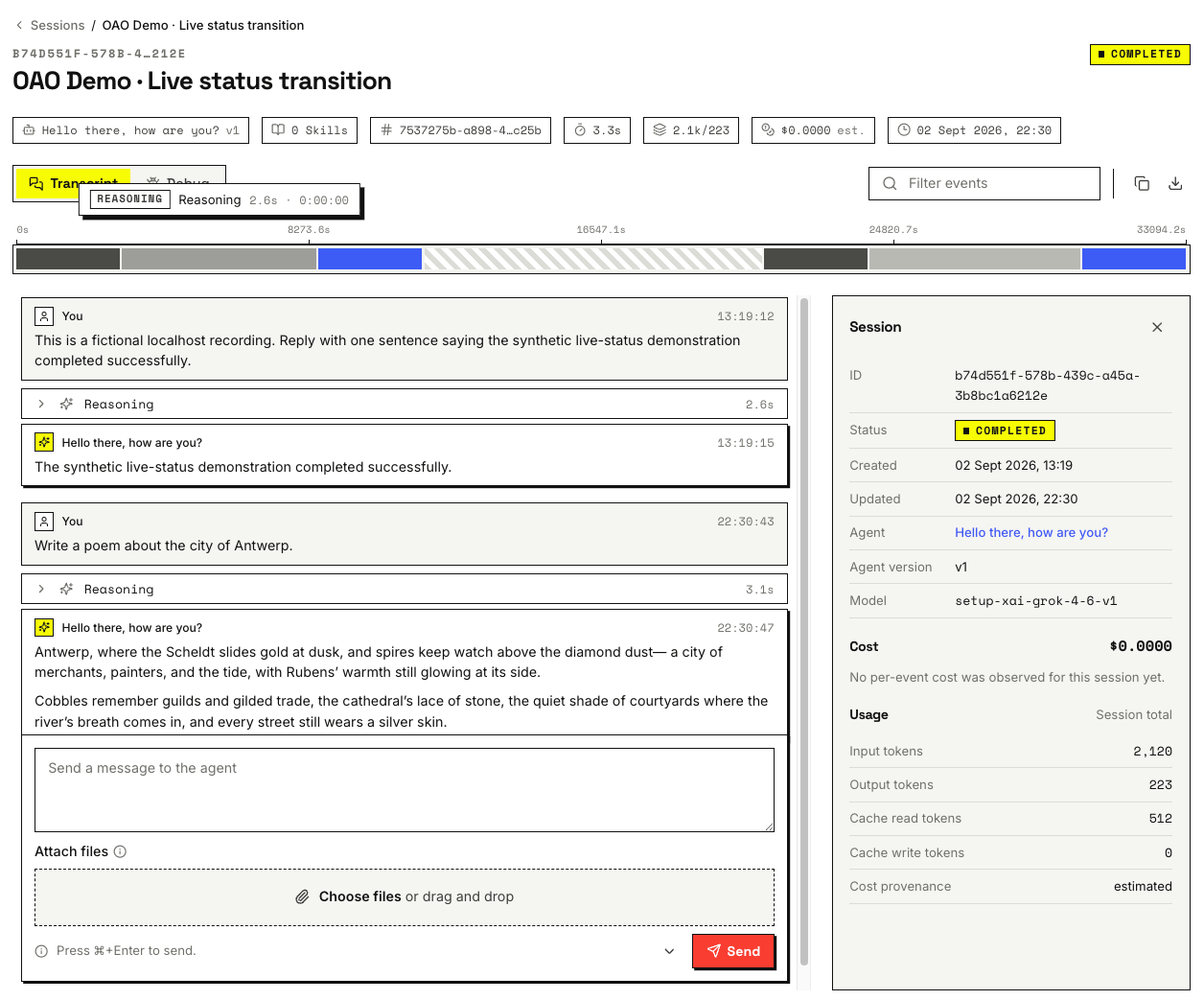
Transcript: the full conversation and event stream for a session, with usage and cost. The same data is available through the API.
What comes next
The platform is still in early beta and we plan to add a lot of features in the coming months. But I thought, why not open source it so other companies can make use of it too, and perhaps help us by suggesting some interesting features .
OAO began as infrastructure we needed at Vectrix. We are open sourcing it because I suspect we are not the only team that wants agents to handle messy work without handing over control of the system around them.
If you want to have a look: